
Ragdoll Football Diving: Controls and Defensive Tips
Master Ragdoll Football diving controls on PC, mobile, and console. Learn how to time your approach, line up tackles, and defend without overcommitting.
Jump to

How to Dive in Ragdoll Football
A runner heading for the end zone makes every defensive decision feel urgent. Ragdoll Football diving starts with X on PC, the DIVE button on mobile, or X on Xbox and Square on PlayStation. Learn Ragdoll Football diving alongside the tackle input so you can focus on reaching the ball carrier when the play gets crowded.
The controls below cover diving and the movement inputs you need around it. Pay attention to the console button names: the PC keyboard’s X key and the Xbox controller’s X button share a label, while PlayStation uses Square.
| Action | PC | Mobile | Xbox / PlayStation |
|---|---|---|---|
| Dive | X | DIVE button | X / Square |
| Move | WASD | Left-side joystick | Left Stick |
| Jump | Space | JUMP button | A / Cross |
| Tackle | Left Click | Tap | RT / R2 |
On PC, keep your movement hand ready to reach X while steering with WASD. On a controller, practice moving between the Left Stick, dive button, and tackle trigger. On mobile, locate the DIVE button before a live pursuit demands your attention.
The dive input also has other jobs. On PC, X handles diving, handing off, and canceling a throw. On Xbox and PlayStation, X or Square handles diving and handing off, while LT or L2 cancels a throw.
Learn those shared bindings before switching between offense and defense. If you have just finished playing quarterback, deliberately reset your attention to your defensive controls.
Open Ragdoll Football on Roblox when you are ready to put the controls into practice.
Separate the Dive Input From the Tackle Input
The key distinction in Ragdoll Football diving is that diving and tackling have separate controls. Build your defensive decisions around both actions instead of reaching for the dive button whenever an opponent gets close.
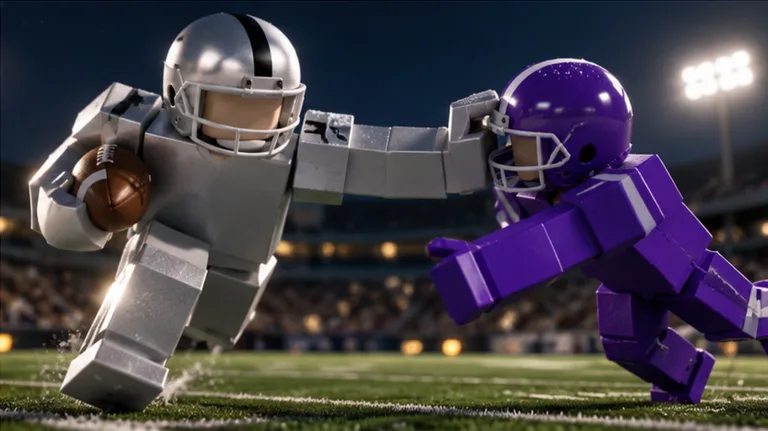 Image: Roblox / BloxyBricks
Ragdoll Football uses physical contact for its tackles, with bodies hitting, grabbing, and dragging. That makes positioning worth your attention. Read the runner’s path, move into the encounter, and keep the tackle input ready.
| Defensive action | PC input | Console input |
|---|---|---|
| Move toward the runner | WASD | Left Stick |
| Dive | X | X / Square |
| Tackle | Left Click | RT / R2 |
| Adjust the camera | Right Click + Drag | Right Stick |
For a straightforward pursuit, organize your decisions in this order:
- Find the ball carrier. Keep your attention on the player carrying the football.
- Read the direction of travel. Watch where the runner is heading before choosing your approach.
- Move into position. Use your movement controls to line up the encounter.
- Choose your action. Use the separate dive or tackle binding deliberately.
- Watch the result. Follow the play until you can see whether the runner has been stopped.
Keep those steps simple during a crowded play. Trying to remember every binding while tracking several players makes it harder to notice a change of direction.
Avoid judging a defensive attempt only by how dramatic the collision looks. Watch the football and the runner afterward. A helmet coming off is eye-catching, but your immediate job is to follow the outcome of the play.
Improve Your Approach Before Pressing Dive
For Ragdoll Football diving practice, start with your approach. Give yourself a clear view of the runner, then decide where to move. Use the dive button as a deliberate action within that pursuit.
Track the runner’s path
Watch the ball carrier’s direction rather than staring at your own character. If you chase only the spot the runner currently occupies, you spend your attention reacting to where the play has already been.
Instead, steer toward the developing encounter. Keep adjusting while you still have a clear view of the runner. When the runner changes direction, reassess your movement before pressing another action button.
Treat this as a positioning exercise: identify the target, follow the path, and choose the input. Keep the sequence consistent enough that you can recognize which decision needs work afterward.
Keep the camera involved
Your camera controls deserve the same practice as your dive binding. Use them to keep the ball carrier visible as the play changes direction.
| Camera action | PC | Mobile | Xbox / PlayStation |
|---|---|---|---|
| Turn the camera | Right Click + Drag | Drag | Right Stick |
| Change zoom | Scroll | Pinch | D-Pad Up/Down |
Set a view that lets you follow both your character and the runner. Adjust the zoom when you need a different view of the play, then return your attention to movement.
On mobile, practice moving with the left-side joystick while managing the camera with a drag. On console, get comfortable steering with the Left Stick and adjusting the view with the Right Stick. On PC, rehearse camera turns alongside WASD movement.
Read the space around contact
Other players can crowd the route to the football. Look at the space between you and the ball carrier before deciding how to approach.
If a teammate is already confronting the runner, watch the runner’s next move. Keep your own view of the football instead of focusing entirely on your teammate’s collision.
Near the sideline, pay attention to the boundary as well as the runner. Near the end zone, track the goal line. Use those visible landmarks to understand the immediate defensive situation and choose your movement.
Build a Focused Diving Practice Routine
Keep Ragdoll Football diving practice specific. Pick one part of the play to work on, then review that part after each attempt. Trying to improve camera control, pursuit, tackling, and pass defense simultaneously makes individual mistakes harder to identify.
Start with the inputs, move into pursuit, and then add the decisions that come with a live opponent.
Learn the bindings without looking away
Practice reaching the dive and tackle controls while keeping your eyes on the field. Say the actions to yourself if that helps: move, camera, dive, tackle.
On PC, remember that Left Click tackles while holding Left Click aims a throw when you are passing. On console, RT or R2 serves those same tackle and throwing roles. Keep the current play in mind when using a shared control.
On mobile, learn where the JUMP and DIVE buttons sit relative to the joystick. Aim to recognize each button immediately.
Practice tracking before adding an action
During a pursuit, focus on keeping the ball carrier visible. Turn the camera as needed and steer with the movement control.
Once you can follow the runner without losing the view, add the decision to dive or tackle. Keep your attention on whether you understood the runner’s direction before pressing the button.
Use this short review after an attempt:
- Did I keep the ball carrier in view?
- Did I react to the runner’s direction?
- Did I press the action I intended?
- Did I watch what happened after contact?
These questions separate a control mistake from a positioning mistake. If you pressed tackle when you intended to dive, rehearse the bindings. If you lost sight of the runner, spend the next pursuit working on the camera.
Review the decision, then reset
After a missed attempt, identify the earliest decision you would change. Start with the view, then movement, then the action input.
For example, if a runner changes direction while your camera faces elsewhere, work on tracking that turn. If you reach the encounter but press the wrong button, focus on the binding.
Keep Ragdoll Football diving practice tied to something you can actually observe. “I pressed X while I could still see the runner” gives you a clearer point to review than “I need better defense.”
Connect Diving Practice to Defensive Goals
Ragdoll Football diving belongs within a wider defensive skill set. Keep working on tackles, coverage, and following possession changes as you learn the dive input.
The game awards XP for big plays and features an overall rating climb from 60 to 99 OVR. Use the defensive badges as concrete objectives while practicing the actions each one requires.
| Badge | Unlock requirement |
|---|---|
| Anchor | Record 10 tackles in one game |
| Hat Trick | Record 3 interceptions in one game |
| Pick 6 | Intercept a pass and return it for a touchdown |
For Anchor, concentrate on tracking ball carriers and using the tackle control deliberately. Count progress through completed tackles rather than through dive attempts.
For Hat Trick, keep your attention on pass defense. Follow receivers and the football, and recognize when the play requires coverage rather than pursuit of a runner.
For Pick 6, recognize the change of possession after an interception. Once you have the football, your objective becomes returning it for a touchdown.
Keep those goals distinct during practice. Work on Ragdoll Football diving when you want to learn the input and its place in your movement decisions. Work on tackling when you want to improve your approach to contact. During passing plays, keep watching the ball instead of letting a dive attempt pull all your attention toward one opponent.
Finish each play by checking the result, then carry one adjustment into the next possession.
FAQ
What is the Ragdoll Football diving button?
Press X on PC, tap DIVE on mobile, or press X on Xbox / Square on PlayStation. On PC, X also handles handing off and canceling a throw. On console, X or Square also handles handing off.
Is diving the same control as tackling?
Diving and tackling use separate inputs. Tackle with Left Click on PC, Tap on mobile, or RT on Xbox / R2 on PlayStation. Learn both bindings so you can choose your intended action while following the ball carrier.
How should I practice diving on defense?
Start by keeping the runner visible and moving into position. Then practice choosing the dive or tackle input deliberately. After each attempt, review your camera angle, approach, and button choice before changing something on the next play.
Which badge requires tackles?
Anchor requires 10 tackles in a single game. The other defensive objectives include Hat Trick, which requires 3 interceptions in one game, and Pick 6, which requires returning an interception for a touchdown.
Continue with
 Ragdoll Football Interceptions: Coverage and Pick TipsImprove your Ragdoll Football interceptions with practical coverage tips, platform controls, smarter positioning, and clear goals for Pick 6 and Hat Trick.
More in Defense
See all DefensePopular pages
Ragdoll Football Beginner Guide: Controls and Winning Tips
This Ragdoll Football beginner guide covers PC, mobile, and console controls, smarter tackles, passing tips, and the basics of earning XP. Hit the field!
Ragdoll Football Camera Controls: PC, Mobile & Console
Learn Ragdoll Football camera controls for PC, mobile, and console, including how to rotate the view, adjust zoom, and keep the ball in sight during plays.

Ragdoll Football Cancel Throw: PC and Console Guide
Learn Ragdoll Football cancel throw controls on PC, Xbox, and PlayStation, plus practical quarterback tips for reading coverage and avoiding rushed passes.
Ragdoll Football Pick 6: Interceptions and Badge Tips
Earn Ragdoll Football pick 6 badge by intercepting a pass and scoring. Learn defensive positioning, return tips, and controls for PC, mobile, and console.
Join the community
Official channels for news, updates and player help: