Ragdoll Football Cancel Throw: PC and Console Guide
Learn Ragdoll Football cancel throw controls on PC, Xbox, and PlayStation, plus practical quarterback tips for reading coverage and avoiding rushed passes.
Jump to

How to Cancel a Throw in Ragdoll Football
Your receiver looks open—then a defender steps into the passing lane. The Ragdoll Football cancel throw controls let you stop aiming instead of committing to that pass: press X on PC or LT / L2 on console. Learn the Ragdoll Football cancel throw input alongside your throwing controls so you can change your decision when coverage closes.
The distinction is simple: releasing your throwing input throws the ball. Canceling uses a separate button. If you want to reconsider a pass, reach for cancel while you are aiming instead of letting go of the mouse button or right trigger.
| Platform | Aim a throw | Throw the ball | Cancel the throw |
|---|---|---|---|
| PC | Hold Left Click | Release Left Click | X |
| Xbox | Hold RT | Release RT | LT |
| PlayStation | Hold R2 | Release R2 | L2 |
These are the controls for the October 15, 2026 version of the game. Keep the platform differences straight, especially when switching between keyboard and controller.
Use this sequence when practicing:
- Hold your platform’s throwing input to aim.
- Look at your intended receiver and the defender nearest the passing lane.
- If you decide against the pass, press the cancel input while aiming.
- Reassess the play before starting another throw.
Canceling belongs in your quarterback decision-making, alongside choosing a receiver and watching the rush. Use it when your original target stops looking like the throw you want to make.
Keep the purpose clear, though: canceling changes your throwing decision. You still need to deal with the defenders around you. After canceling, check the immediate pressure before spending more time looking downfield.
Official page: Ragdoll Football (roblox.com)
PC Controls: Separate Cancel From Release
On keyboard and mouse, hold Left Click to aim, release it to throw, and press X to cancel. That makes the relationship between your mouse hand and keyboard hand especially important.
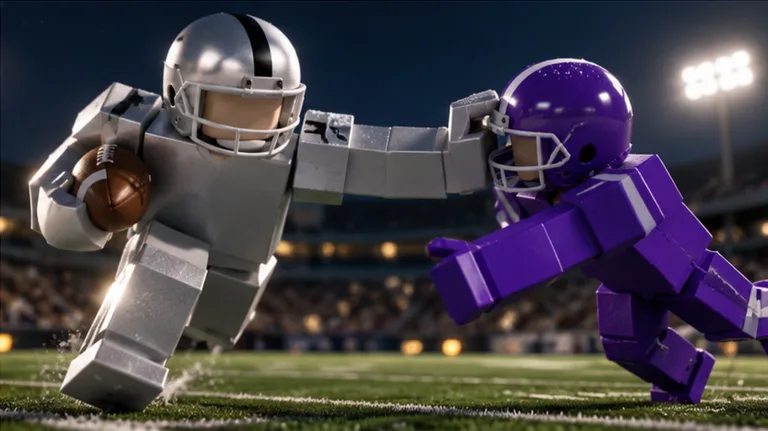 Image: Roblox / BloxyBricks
Keep your movement fingers ready while aiming. When you decide against a pass, use X deliberately rather than relaxing your mouse finger. Practice that distinction until “stop this throw” and “throw now” feel like separate choices.
The Ragdoll Football cancel throw key also shares other actions. X handles diving and handing off, so read it in the context of what your player is doing.
| PC input | Assigned action |
|---|---|
| WASD | Move |
| Space | Jump |
| Left Click | Tackle, hike as quarterback, or kick |
| Hold Left Click, then release | Aim, then throw |
| X | Dive, hand off, or cancel throw |
| V | Take a knee for a touchback |
| Right Click + Drag | Move the camera |
| Scroll | Zoom |
Watch Your Current Action
Press X as the cancel command when you are aiming a throw. Outside that action, the same key belongs to the dive and handoff controls.
Avoid treating every X press as the same instruction. Before pressing it, recognize whether you are preparing a pass or doing something else with the ball. That habit matters when a crowded play turns into a scramble.
Keep Your View Useful
Use Right Click + Drag to adjust the camera and the scroll wheel to change zoom. Set up a view that lets you inspect both your receiver and the space around your quarterback.
Check your view before starting a throw whenever possible. Trying to adjust the camera, track coverage, and remember a new cancel input at the same time gives you several decisions to manage at once.
For your initial Ragdoll Football cancel throw practice, focus on the mouse-and-X sequence. Add movement and camera adjustments once you can choose between canceling and releasing without confusing them.
Xbox and PlayStation: Cancel With the Left Trigger
Console controls separate throwing and canceling across the triggers. Hold RT on Xbox or R2 on PlayStation to aim. Release that trigger to throw, or use LT / L2 to cancel.
Keep your left index finger ready when you begin aiming. If the target becomes covered, press the left trigger rather than releasing the right trigger as your reaction to the changing play.
| Action | Xbox | PlayStation |
|---|---|---|
| Move | Left Stick | Left Stick |
| Camera | Right Stick | Right Stick |
| Zoom | D-Pad Up/Down | D-Pad Up/Down |
| Jump | A | Cross |
| Dive or hand off | X | Square |
| Tackle, hike as quarterback, or kick | RT | R2 |
| Aim a throw | Hold RT | Hold R2 |
| Release a throw | Release RT | Release R2 |
| Cancel throw | LT | L2 |
| Take a knee for a touchback | B | Circle |
| Menus | Y | Triangle |
Remember the PC-to-Console Difference
The Xbox X button is assigned to diving and handing off. The console Ragdoll Football cancel throw input is the left trigger.
If you play on both PC and Xbox, connect each action to its physical location: keyboard X cancels on PC; the left trigger cancels on a controller. That distinction prevents the shared letter from becoming a distraction.
On PlayStation, keep Square associated with diving and handing off, and L2 associated with canceling your aimed throw.
Use the right stick to inspect coverage, then make a deliberate trigger decision. Practice aiming and canceling while standing still before combining the sequence with left-stick movement. Keep each practice attempt focused on clean input rather than a difficult completion.
Read Coverage Before Committing to a Pass
Knowing the button answers the control question. Choosing when to press it takes attention to the play.
Start by looking beyond the receiver’s jersey. Check the defender between you and the target, the defender following the route, and the pressure approaching your quarterback. Make your throwing decision from the current picture instead of the opening you saw when you first began aiming.
Use Ragdoll Football cancel throw as part of that reassessment. If the passing lane changes, reconsider the pass rather than following through simply because you already started aiming.
Check the Lane, Then the Receiver
A receiver can draw your attention while a nearby defender threatens the route to the ball. Before releasing, look through the intended passing lane.
If a defender moves into that space, cancel and scan again. Look for another receiver with clearer separation, while continuing to watch the rush.
Avoid selecting a target solely because that teammate is asking for the ball. Check whether you can see a pass you actually want to attempt.
Respect Double Coverage
When two defenders surround your intended receiver, reassess before releasing. Look elsewhere instead of trying to justify the original target.
Keep your next read specific. Find a receiver, inspect the nearby defender, and decide whether to throw. Sweeping the camera around without settling on a target can leave you spending time without improving the decision.
Watch the Rush After Canceling
Ragdoll Football uses physical contact for tackles, grabs, and dragging. Keep an approaching defender in your decision even when you are concentrating on a route.
Canceling a pass should lead directly into another decision. Check whether you have room to keep looking, whether another target is available, or whether you should use your movement controls to respond to pressure.
| Situation | Decision to practice |
|---|---|
| A defender enters your intended passing lane | Cancel and reassess the target |
| Two defenders surround your receiver | Scan another receiver before committing |
| A rusher closes while you aim | Check immediate pressure before extending the read |
| You decide to complete the throw | Release the held throwing input |
Treat these as decision prompts, not a requirement to cancel every contested pass. Inspect the play and choose deliberately.
Do not assume that waiting will make the target easier to hit. Watch what the receiver and defenders are doing now, and keep your quarterback’s situation part of the same read.
Practice Aim, Cancel, and Reassess
Build your Ragdoll Football cancel throw routine around a clear decision. Begin aiming, decide whether you still want the pass, then use the appropriate input.
You do not need an elaborate drill. Work through the controls during quarterback opportunities, keeping the objective narrow enough that you can recognize what happened.
Practice the Input Before the Read
Start by identifying the three actions:
- Aim: Hold Left Click, RT, or R2.
- Throw: Release the held throwing input.
- Cancel: Press X, LT, or L2 for your platform.
During practice, decide to cancel before you start aiming. Then execute that choice deliberately. On a separate attempt, decide to throw and use the release input.
Keep the focus on distinguishing the actions. Once that feels comfortable, make the decision while watching coverage.
Add a Receiver and a Defender
Choose an intended receiver and look at the defender nearest that route. Begin aiming, then inspect the lane again before committing.
If you decide the pass is no longer worth attempting, cancel it. Reassess the field instead of immediately starting the same throw from habit.
Use the Ragdoll Football cancel throw mechanic to support a changed decision. Repeating the cancel input without looking at coverage leaves out the reason you needed it.
Add Movement Without Losing Track of Pressure
Bring movement into practice after you can separate canceling from throwing. Use WASD on PC or the left stick on console, and keep your camera pointed where it helps you judge the play.
After canceling, look near your quarterback before returning your attention downfield. Keep the closest defender in view when deciding how long to continue searching.
If an attempt goes wrong, identify the specific choice:
- Did you release when you meant to cancel?
- Did you use the correct button for your platform?
- Did you keep aiming after the passing lane closed?
- Did you cancel, then lose track of an approaching defender?
Correct that part on the next opportunity. Keep your Ragdoll Football cancel throw practice tied to a visible action and a deliberate decision, rather than judging every attempt only by whether the offense gained yards.
FAQ
What is the Ragdoll Football cancel throw button?
Press X on PC, LT on Xbox, or L2 on PlayStation while aiming a throw. On PC, aim by holding Left Click. On console, hold RT or R2.
Does releasing Left Click cancel a throw?
Releasing Left Click throws the ball. Press X when you want to cancel an aimed throw on PC. The same distinction applies on console: releasing RT or R2 throws, while LT or L2 cancels.
Why is X also listed for diving and handing off?
On PC, X has three assigned actions: dive, hand off, and cancel throw. Use it as the cancel command while aiming. Console separates those assignments: X / Square handles diving and handing off, while LT / L2 cancels throws.
When should I cancel instead of throwing?
Cancel when you decide against the pass you are aiming. Check for a defender entering the passing lane, double coverage around your target, or pressure that demands your attention. Reassess immediately and choose your next action deliberately.
Continue with
 Ragdoll Football Catching Guide: Routes and ControlsImprove your Ragdoll Football catching with receiver positioning, camera controls, route tips, and smarter decisions after the catch. Get set for kickoff.
More in Offense
Ragdoll Football Handoff: Controls and Running Tips
Learn Ragdoll Football handoff controls on PC and console, understand shared buttons, and plan cleaner running plays with practical tips for your game.
Ragdoll Football Hiking: Snap Controls and QB Tips
Learn Ragdoll Football hiking controls on PC, mobile, and console, then sharpen your snap timing, passing decisions, and teamwork before your next drive.
Ragdoll Football Kicking Guide: Controls and Key Tips
Learn Ragdoll Football kicking controls on PC, mobile, and console. Get practical tips for kick situations, camera setup, and avoiding input mistakes.
Ragdoll Football Passing: Controls and Smarter Throws
Improve your Ragdoll Football passing with PC, mobile, and console controls, smarter reads, and practical tips to avoid interceptions and move the chains.
Join the community
Official channels for news, updates and player help: