Ragdoll Football Black Visor: Price and Gear Guide
Get the Ragdoll Football black visor for 50 Robux. Compare visor colors, check other gear prices, and learn the controls for your next game on Roblox now.
Jump to

What Does the Ragdoll Football Black Visor Cost?
Give your helmet a darker finish with the Ragdoll Football black visor. It costs 50 Robux and unlocks a black reflective visor for your helmet in the Roblox game. If you’re shopping for the Ragdoll Football black visor, the price and appearance are the key details to know before spending.
This guide covers the Roblox American football experience, where tackles send bodies tumbling and players earn XP through big plays. Keep that distinction in mind when searching: browser games with similar names can involve soccer instead.
Here are the essential purchase details for October 2026:
| Detail | Black Visor |
|---|---|
| Purchase type | Game pass |
| Price | 50 Robux |
| Appearance | Black reflective visor |
| Equipment placement | Helmet |
| Game | Ragdoll Football on Roblox |
The purchase has a specific purpose: adding that black reflective finish to your helmet. Choose it because you want the look, and keep your progression goals focused on making plays.
Start through the Ragdoll Football Roblox game page. Check the item name and Robux amount before approving a purchase, especially when comparing it with the other visor colors.
The Ragdoll Football black visor is priced separately from the Lewis Helmet and Guardian Cap. Keep those purchases distinct when planning your outfit. A visor changes the helmet’s appearance in a different way from the Guardian Cap’s padded outer shell, so decide which piece you actually want before committing your Robux.
Black Visor vs. Other Visor Colors
Black is one of several reflective visor options. Each color below costs 50 Robux, so your decision can stay focused on appearance rather than a price difference.
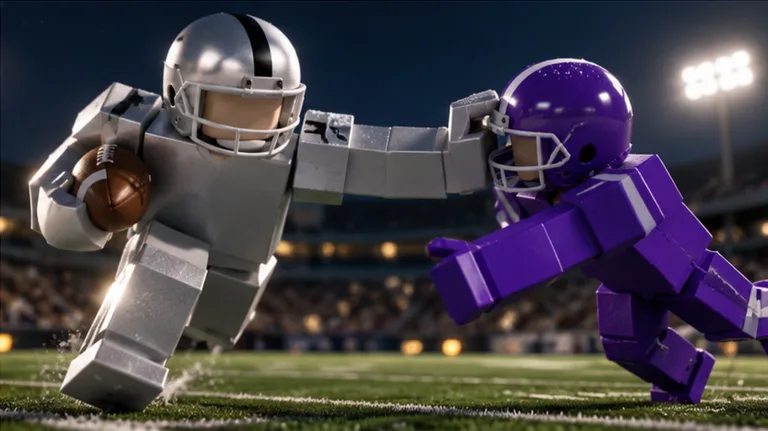 Image: Roblox / BloxyBricks
| Visor | Price | Reflective color |
|---|---|---|
| Black Visor | 50 Robux | Black |
| Red Visor | 50 Robux | Red |
| Magenta Visor | 50 Robux | Magenta |
| Purple Visor | 50 Robux | Purple |
| Blue Visor | 50 Robux | Blue |
| Pink Visor | 50 Robux | Pink |
| Clear Visor | 50 Robux | Clear |
| Green Visor | 50 Robux | Green |
| Orange Visor | 50 Robux | Orange |
Choose black if a dark visor is the finish you want. Compare it with a brighter option such as red, pink, or orange before buying, particularly if color is the main reason you’re changing your helmet.
Because the prices match, there’s no need to stretch your budget simply to choose black over another visor color. Pick the appearance you expect to enjoy during regular games.
The Ragdoll Football black visor also gives you a straightforward shopping target: the item is named Black Visor. Keep that exact name in mind instead of assuming that another helmet purchase includes the same accessory.
Before spending, work through this short checklist:
- Decide whether you want a visor, a different helmet, or a padded helmet cover.
- Compare black with the other reflective colors.
- Check that the purchase says Black Visor.
- Review the 50 Robux amount before approving it.
If you’re choosing purely for style, let your own preference settle the decision. There’s no reason to turn a color choice into a complicated purchase. Spend your attention on the piece you want to see on your player, then get back to football.
Compare the Visor With Other Gear Purchases
The gear options extend beyond visor colors. You can also buy the Lewis Helmet, the Guardian Cap, and Custom Numbers, with each purchase serving a different customization goal.
| Game pass | Price | What it unlocks |
|---|---|---|
| Black Visor | 50 Robux | Black reflective helmet visor |
| Lewis Helmet | 300 Robux | Lewis Helmet |
| Guardian Cap | 260 Robux | Padded soft shell over the helmet in team colors |
| Custom Numbers | 100 Robux | Jersey number selection from 1–99 |
For a visor purchase, focus on the visor itself. For a padded outer layer, look at the Guardian Cap. Its shell follows your team’s colors, which makes it a different visual choice from selecting a reflective visor color.
Custom Numbers handles another part of your player’s identity. It lets you select a jersey number from 1–99 through the Gear menu’s NUMBER tab. That number stays yours each game until you change it.
Use those differences to narrow your shopping list. Write down whether your goal is a dark helmet detail, a padded helmet silhouette, or a particular jersey number. Then match that goal to the relevant purchase.
The Ragdoll Football black visor costs less than each of the other passes in this comparison. That makes the price easy to assess, but choose by the feature you want rather than buying something simply because it costs less.
Keep the two currencies straight, too. The Black Visor game pass costs Robux. When you’re deciding whether to purchase it, use that Robux price as your budget reference.
For a focused customization purchase, settle on one priority before browsing everything else. If the visor is what brought you here, check its name, check its price, and make that decision on its own merits.
Learn the Controls Before Your Next Game
Once your gear decision is settled, spend a little time learning the inputs that shape every possession. Ragdoll Football uses contextual controls: the same button can tackle, hike, or kick depending on your role.
That matters when you move between offense, defense, and special teams. A button you used to challenge the ball carrier becomes part of starting a play or kicking the ball in another situation.
| Action | PC | Mobile | Xbox / PlayStation |
|---|---|---|---|
| Move | WASD | Left-side joystick | Left Stick |
| Jump | Space | JUMP button | A / Cross |
| Tackle / Hike / Kick | Left Click | Tap | RT / R2 |
| Aim and throw | Hold Left Click, release to throw | Hold still, lift to throw | Hold RT / R2, release |
| Dive | X | DIVE button | X / Square |
| Camera | Right Click + Drag | Drag | Right Stick |
| Zoom | Scroll | Pinch | D-Pad Up/Down |
On PC, X also handles handoffs and cancels a charged throw. On console, LT / L2 cancels a throw, while Y / Triangle opens menus.
Practice the difference between pressing and holding your main action button. As quarterback, holding the throwing input lets you aim; releasing sends the pass. Avoid rushing the release just because a receiver starts moving downfield.
Use your camera controls deliberately. Adjust the view before a play so you can follow receivers, defenders, and the ball without fighting the camera at the same time.
The Ragdoll Football black visor is one part of your player’s appearance; the controls deserve their own practice. Learn movement, throwing, and tackling before trying to string several actions together during a crowded play.
Start with a simple practice sequence:
- Move and jump until you’re comfortable steering your player.
- Practice holding the throwing input and releasing toward your intended spot.
- Learn the dive input.
- Reposition your camera between plays.
Keep each practice goal narrow. Work on aiming during one possession, then concentrate on staying in position during the next defensive series.
Make Your Big Plays Count
Ragdoll Football starts players at 60 OVR, with progression reaching 99 OVR. Earn XP through big plays as you work toward that higher overall rating.
Use specific football objectives to give each game some direction. The game’s badges offer clear targets across passing, receiving, tackling, and interceptions.
| Badge | Requirement |
|---|---|
| Pick 6 | Intercept a pass and return it for a touchdown |
| Hat Trick | Record 3 interceptions in one game |
| 300 Yards | Record 300 passing yards in one game |
| Anchor | Record 10 tackles in one game |
| 200 Yards | Record 200 receiving yards in one game |
Choose an objective that matches the position you’re playing. As quarterback, work toward productive passing possessions. As a receiver, focus on getting into space and staying available for a throw. On defense, practice tracking the ball carrier and lining up contact.
For interceptions, watch where the pass is headed rather than following only the receiver. Put yourself in position to challenge the ball. A return touchdown fulfills the Pick 6 requirement, while Hat Trick asks for three interceptions within the same game.
Tackling deserves patience because contact uses ragdoll physics. Bodies can grab, drag, and knock one another around instead of following a fixed takedown animation. Hard contact can even knock a helmet off.
Line up your approach before committing to a tackle. Use movement to close the angle, and keep the ball carrier in view as contact develops. Give yourself a clear target instead of charging into a cluster of players.
As quarterback, use the aiming arc and target ring to judge your intended landing spot. Place the pass with the receiver’s route in mind, then release. Practice that sequence until aiming and throwing feel connected.
Enjoy the Ragdoll Football black visor as part of your outfit while keeping your match goals concrete: complete passes, contribute on defense, and turn opportunities into big plays. Those goals give you something useful to work on after the gear purchase is finished.
FAQ
How much does the Ragdoll Football black visor cost?
The Ragdoll Football black visor costs 50 Robux as a game pass. It unlocks a black reflective visor for your helmet in the Roblox experience. Check the item name and purchase amount before approving the transaction.
Do the other visor colors cost more than black?
The red, magenta, purple, blue, pink, clear, green, and orange visors each cost 50 Robux, matching the Black Visor. Compare their colors and choose the appearance you want.
Is the Guardian Cap the same item as the Black Visor?
They are separate purchases. The Guardian Cap costs 260 Robux and adds a padded soft shell over your helmet in your team’s colors. The Black Visor costs 50 Robux and adds the black reflective visor.
How do you change your jersey number?
The Custom Numbers game pass costs 100 Robux. It lets you choose a number from 1–99 in the Gear menu’s NUMBER tab. Your selected number stays yours each game until you change it.
Continue with
 Ragdoll Football Custom Numbers: Price & Setup GuideRagdoll Football custom numbers let you choose a jersey number from 1–99. Learn 100 Robux price, Gear menu steps, and how your choice carries into games.
More in Gear
Ragdoll Football Magenta Visor: Price and Gear Guide
Explore the Ragdoll Football magenta visor, its 50 Robux price, other visor colors, and helmet options so you can plan your gear purchase with confidence.
Ragdoll Football Red Visor: Price, Colors, and Gear
Get the Ragdoll Football red visor for 50 Robux. Compare helmet visor colors, understand what the pass unlocks, and brush up on basic football controls.
Ragdoll Football Game Passes: Prices and Gear Guide
Compare Ragdoll Football game passes, including visor colors, Custom Numbers, Guardian Cap, and Lewis Helmet prices, before spending your Robux on gear.
Ragdoll Football Helmets: Prices, Visors & Gear Guide
Explore Ragdoll Football helmets, Lewis Helmet and Guardian Cap prices, every visor color, and tackle controls to plan your gear purchases before kickoff.
Join the community
Official channels for news, updates and player help: